Can you even fsync correctly
An in-depth view into writing bytes to a storage device and whether it can be done correctly
Eons ago when I was still yet a young one I was taught how to create and write text into a file.
#include <stdio.h>

int main() {
  FILE *fp = fopen("data.txt", "w");
  fprintf(fp, "Hello World !");

  fclose(fp);
}
The code was simple and the logic clear, there’s a function somewhere called fopen that I can give a filename to and
I can print into this file the same way I print into stdout via printf and then I close the file.
Young me had no worries, no knowledge of OS entrails such as page caches or ioctl and absolutely no understanding of
what actually happens. All I knew was that doing the following incantation cc w1.c followed by ./a.out would yield
a file with the beautiful sentence “Hello World!”.
Ignorance is bliss they say and it is true, I was very happy back then the computer captivated me. I was enthralled, it all felt like magic.
Nowadays on the other hand I know better. I know not to be beguiled by the computer, I know that the machine is not captivating nor magical, I know that it is a house of lies and I was lied to. Well I wasn’t lied to but at least given the impression that life was very simple.
Of course nowadays we all have grown up to become something of very experienced computer users so let’s pull out
strace and observe what the program above does.
/tmp
❯ mkdir can-you-fsync

/tmp
❯ cd can-you-fsync/

/tmp/can-you-fsync via C v16.2.1-gcc took 39s
❯ cc w1.c

/tmp/can-you-fsync via C v16.2.1-gcc
❯ ./a.out

/tmp/can-you-fsync via C v16.2.1-gcc
❯ cat data.txt
Hello World !

/tmp/can-you-fsync via C v16.2.1-gcc
❯ strace ./a.out
execve("./a.out", ["./a.out"], 0x7ffd29c5a010 /* 96 vars */) = 0
-- snip C runtime initialization. ---
openat(AT_FDCWD, "data.txt", O_WRONLY|O_CREAT|O_TRUNC, 0666) = 3
fstat(3, {st_mode=S_IFREG|0644, st_size=0, ...}) = 0
write(3, "Hello World !", 13)           = 13
close(3)                                = 0
exit_group(0)                           = ?
+++ exited with 0 +++

/tmp/can-you-fsync via C v16.2.1-gcc
❯ cat data.txt
Hello World !
Well ain’t that curious, to be honest I assumed I would see a few lines of “Hello World !” not just one
but also I don’t see any fsync out there. Did my data reach the disk ?
That intro was more for my benefit than anything else, I wanted to add some flair since my previous posts
on join ordering read more like dry mathematics textbooks. My goal in this post is not to re-hash what’s been
said about fsync usage in general applications or
in Postgres which caused quite a kerfuffle that
it was named fsyncgate. You can find quite a few stories on the subject here
my goal today in this post is to answer two questions that I find myself re-explaining or re-arguing about
a few times every year. The first question is of course how exactly does fsync work and how can I understand
the failure modes around it. The second question is much more involved and it’s how can I fsync correctly ?
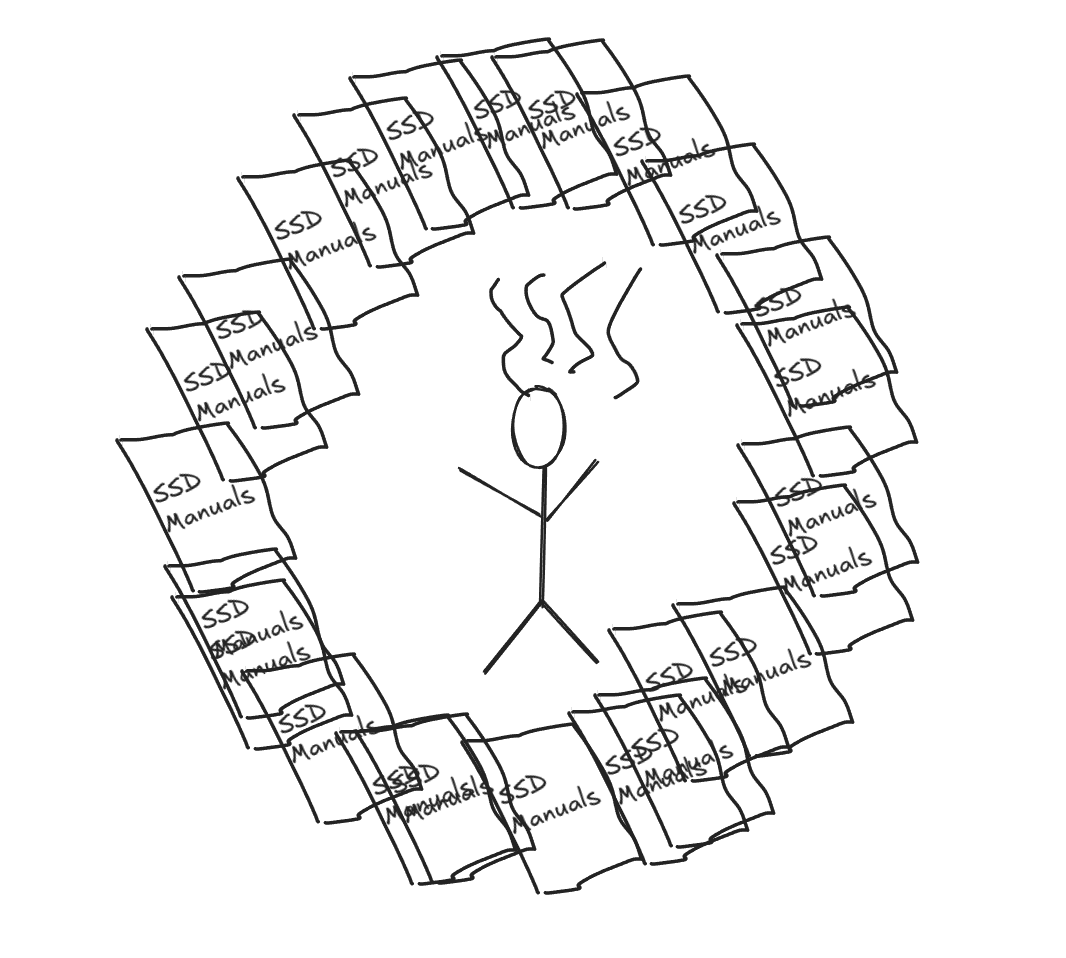
The second question in and of itself is a vague rephrasing of a much more involved question I have often found myself asking. How exactly can I write reliably to disk in any setting ? A question that while trying to answer has pushed me quite close to the brink of insanity.
I/O APIs, fsync and storage devices
One of the most confusing ways to teach programmers is to have them use language level APIs without explaining exactly what’s going on. That’s what happened when I was introduced to writing files on Linux with C and Python it took me a few months of studying from Linux System Programming to go from there to actually understanding what was going on.
Let’s consider the example above and its strace output.
FILE *fp = fopen("data.txt", "w"); // ---------> openat(AT_FDCWD, "data.txt", O_WRONLY|O_CREAT|O_TRUNC, 0666) = 3
fprintf(fp, "Hello World !");
fclose(fp);                        // ---------> write(3, "Hello World !", 13)           = 13
                                   // ---------> close(3)                                = 0
fopen("data", "w")- Calls
openat(AT_FDCWD, "data.txt", O_WRONLY|O_CREAT|O_TRUNC, 0666) - Allocates a
FILEstruct in userspace that wraps an underlying file descriptor and holds a buffer. - You can see that it uses the
O_CREATflag to create the file if it doesn’t exist andO_TRUNC, which truncates it to zero length. There is noO_APPEND(that’s what"a"mode adds), so every run writes at offset 0, which is why we only ever see one line of output. - The buffer is allocated lazily and sized from
st_blksizetypically 4 KBs.
- Calls
fprintf(fp, "Hello World !");- Formats the string via the
printffamily of functions machinery and then memcpy’s 13 bytes intoFILE’s internal buffer in the process heap. - No syscall happens at this point and there is no writing all data is held into the
FILE’s userland buffer (our process heap). - Unless you override the default buffering mode
_IOFBFthe buffer is only written (to page cache i.e. awriteis issued) once it’s full. - If you use
_IOLBF(line buffering), which is the default forstdoutwhen it’s connected to a terminal, then awriteis issued on every\n(which is whyprintfdebugging works). Redirectstdoutto a file or a pipe and it becomes fully buffered, which is why the last lines of yourprintfdebugging go missing when a program with piped output crashes. - If you use
_IONBF(no buffering) which is the default forstderrthen every call issues awrite.
- Formats the string via the
fclose(fp)- Calls
fflush(fp)which issues the actualwritesyscall. This copies the bytes from our process heap into the kernel’s page cache and marks the pages dirty. - Then calls
close(). - Neither step calls
fsync. On Linux,closedoes not flush to disk and POSIX doesn’t require it.
- Calls
What is “flushing” exactly ? In the vocabulary we used and the one exposed by the File I/O API for example “flushing” means the following :
fflush“flushes” from userland, process heap buffers to the kernel page cache and survives process crashes.fsync(fd)andfdatasync(fd)“flushes” from the page cache to the underlying device, plus a device cache flush (FLUSH/FUA)[1] and survives kernel panics and power loss (if everything below behaves).
Depending exactly when the program dies, data loss can happen at a few boundaries.
- If your process dies between
fprintfandfclosethe data is lost completely because it only existed in the process heap. - If your process exits normally
returnfrommaincallsexit()which flushes all open streams (i.e. callsfflush)_exit(man 2 exit) does not flush open streams. - If your machine dies after
fclosethe data is probably gone too. The kernel’s flusher threads wake up everydirty_writeback_centisecs(5s by default) and write back pages that have been dirty for longer thandirty_expire_centisecs(30s by default), or sooner if too much memory is dirty (dirty_background_ratio). ext4 has one exception that applies to our example: when a file that already had data is truncated and rewritten, which is exactly what"w"mode does on the second run, theauto_da_allocheuristic forces the new data out with the next journal commit (every 5s by default). It was added in 2009 after people found files replaced this way came back empty after a crash. - Even after writeback, the drive’s volatile write cache may still be holding it.
- Even then,
data.txtdirectory entry may not be durable because you never fsynced the parent directory.
The parent directory entry is itself a file, following the tradition of everything is a file, with its own inode and data blocks.
The blocks contain records that map names to inode numbers, if you take ext4 for example then each record is a struct ext4_dir_entry_2
that looks like this :
struct ext4_dir_entry_2 {
__le32 inode; -> The inode number
__le16 rec_len;
__u8 name_len; -> "8"
__u8 file_type; -> Regular file.
char name[EXT4_NAME_LEN]; -> "data.txt"
};When you open /home/user/data.txt after a reboot the kernel reads the directory’s blocks, finds the record whose name is data.txt
and follows the inode number (which would exist if you call fsync on the data.txt’s file descriptor) if that record isn’t on disk
the path doesn’t exist even if the inode and its data are perfectly intact.
In fact the act of calling fopen("data.txt", "w") changes many things on disk :
- Creating the file
O_CREATdirties several separate blocks :- inode bitmap and group descriptor would mark its inode as in use e.g. 1234.
- inode table block initializes inode 1234.
- Parent directory’s data blocks are updated to insert a mapping of
data.txtto the inode 1234, this is the “directory entry”.
fsync(fd) is defined in terms of the file referred to by the descriptor it does not necessarily make the directory entry
durable. From the man page :
Calling fsync() does not necessarily ensure that the entry in the directory con‐ taining the file has also reached disk. For that an explicit fsync() on a file descriptor for the directory is also needed
Before digressing into the durability of parent directory entries we stated that even after a writeback reported by the storage
device, the data is not guaranteed to be on the device and may be held in the volatile write cache. This statement is device
dependent of course and referring to the manual will confirm how the device behaves. But to clarify a bit a “writeback finished”
in the context of the kernel interface means that device reported back “OK” or “DONE” so the kernel can go back to doing kernel
things. If a volatile write cache is enabled, the drive is allowed to say “done” while the data is still in its DRAM so if it
suffers a power loss at that moment, the data is gone. When a writeback completes, the kernel’s page-cache folio[2] has had a
PG_writeback cleared in folio_end_writeback
and that was triggered by bio_endio[3] which itself is
triggered when the driver received a completion from the device. In the case of an NVMe it’s a completion queue entry with a
success status. For SATA a Device-to-Host register FIS with no error and for SAS a GOOD status.
The question is then, what did the device promise when it sent that completion ? Well when the write cache is enabled then it promises very little.
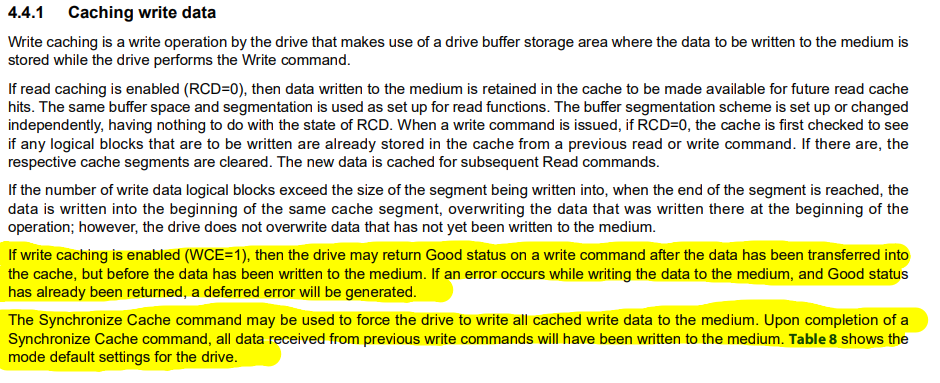
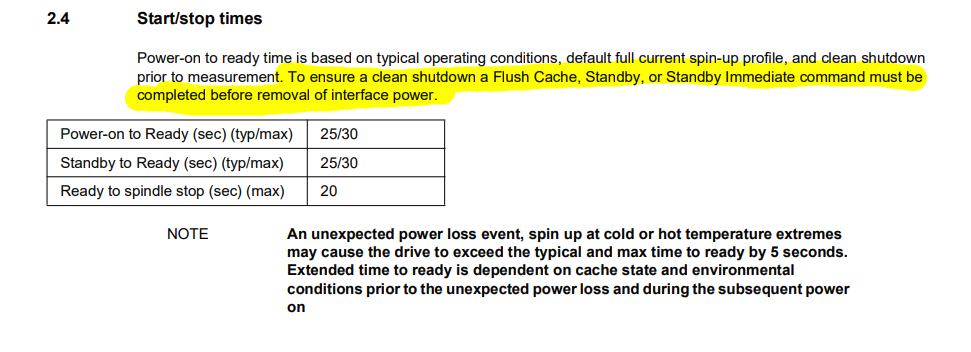
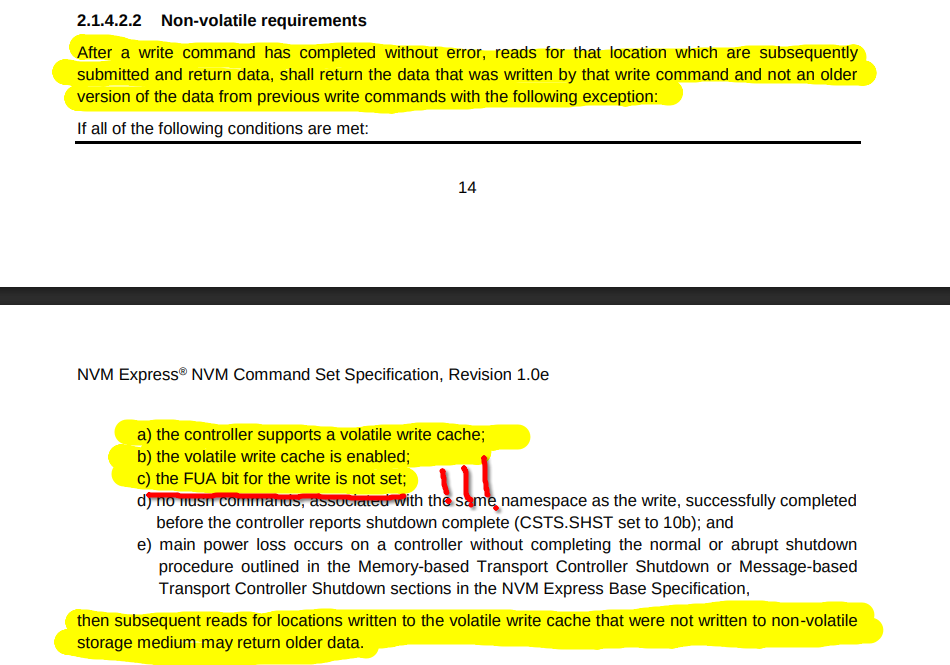
The answer to our question can then be summarized as :
-
SAS (Seagate Exos X24 SAS manual §4.4.1): with WCE=1 the drive may return GOOD once the data has been transferred into its cache. It only puts the data on the platters when the cache needs space, in its own time, or when told to with SYNCHRONIZE CACHE.
-
NVMe (NVM Command Set 1.0e §2.1.4.2.2): the spec lists exactly when a successfully completed write may read back as old data after power returns. That happens when all of these hold:
- The controller has a volatile write cache and it is enabled,
- The write did not have FUA set,
- No Flush completed before the power loss,
- Power was lost without a normal or abrupt shutdown.
-
SATA (Seagate Exos X24 SATA manual §2.4): a Flush Cache or Standby command must complete before interface power is removed. That requirement exists because the 256–512 MB cache is volatile
If we retrace our steps back then after you call fsync the state your data is in is :
- Folio dirty in the page cache and the write back is in progress, data can be lost if the kernel dies or power is lost.
- Writeback complete, folio clean. The data is in the drive’s DRAM cache. Lost if the drive loses power.
- Flush or FUA write completed. The data is on NAND or platters, forever durable unless you take a drill to it.
So that about sums it up right ? Well not exactly. When you say that a “machine dies” it can mean several things so here’s a table that describes what is where when a “machine dies” :
| Event | Does the drive lose power? | Data in the drive’s cache |
|---|---|---|
Process crash / kill -9 | No | Safe (kernel and drive unaffected) |
| Kernel panic, then reboot | Usually no, the drive stays powered through a warm reset | Normally still written out by the drive |
reboot / shutdown | No | Safe. The kernel sends a flush (SYNCHRONIZE CACHE / FLUSH CACHE) and on SATA a STANDBY before power-off. |
| Power cut, PSU failure, unplugged cable | Yes | Lost, unless the drive has power-loss protection |
| Drive firmware crash or controller reset | Effectively yes | Can be lost |
| VM killed, host keeps running | Depends on the hypervisor’s cache mode | The “drive cache” is the host’s page cache, so it depends on whether the host fsyncs |
Well I guess that sums the behaviours we care about ? As long as you use Enterprise Grade SSD (tm) then you have nothing to worry about.
The path through and from fsync
The C File I/O API fflush, as of glibc-2.40 calls _IO_SYNC a
virtual table dispatch that ends up in _IO_new_file_sync.
_IO_acquire_lock (fp);
result = _IO_SYNC (fp) ? EOF : 0;
_IO_release_lock (fp);If the stream has pending output i.e. the branch if (fp->_IO_write_ptr > fp->_IO_write_base) is true then it calls _IO_do_flush a macro
which expands to _IO_do_write. Which itself is a libc dependent prototype that resolves to new_do_write.
new_do_write is what actually issues the write(2) syscall via _IO_SYSWRITE (the syscall wrapper for glibc) which loops on __write until the
data is accepted.
ssize_t
_IO_new_file_write (FILE *f, const void *data, ssize_t n)
{
ssize_t to_do = n;
while (to_do > 0)
{
ssize_t count = (__builtin_expect (f->_flags2
& _IO_FLAGS2_NOTCANCEL, 0)
? __write_nocancel (f->_fileno, data, to_do)
: __write (f->_fileno, data, to_do));
if (count < 0)
{
f->_flags |= _IO_ERR_SEEN;
break;
}
to_do -= count;
data = (void *) ((char *) data + count);
}
n -= to_do;
if (f->_offset >= 0)
f->_offset += n;
return n;
}At this point the bytes are now in the kernel’s page cache and marked as dirty, fclose itself goes through the same path in _IO_new_file_close_it
before closing the descriptor (neither calls fsync).
On to the Kernel and Onwards
So here we now want to call fsync, fsync is a syscall that
takes a single argument the file descriptor and has syscall number 74 (0x4a). The call to fsync in glibc is a raw syscall
there’s nothing added by glibc except the usage of SYSCALL_CANCEL which makes
the call a pthread cancellation point, which matters because fsync can block for a long time. That macro puts the descriptor in $rdi and the syscall number
74 in $rax (on x86-64) and then executes the syscall instruction.
Past this point (the syscall instruction) we are now in kernel space, the syscall instruction jumps to the address the kernel stored in MSR_LSTAR at
boot. The entry stub executes swapgs and switches to the kernel stack. User
registers are saved in struct pt_regs[4] and do_syscall_64 is called, which hands the syscall number to
x64_sys_call. Since Linux 6.9 that’s a switch statement generated from the ABI-defined syscall table
rather than an array of function pointers (indirect calls were removed there as a Spectre-BHI mitigation), and case 74 calls __x64_sys_fsync.
How fsync is defined
The fsync syscall is defined as a call to do_fsync
static int do_fsync(unsigned int fd, int datasync)
{
struct fd f = fdget(fd);
int ret = -EBADF;
if (fd_file(f)) {
ret = vfs_fsync(fd_file(f), datasync);
fdput(f);
}
return ret;
}
SYSCALL_DEFINE1(fsync, unsigned int, fd)
{
return do_fsync(fd, 0);
}
SYSCALL_DEFINE1(fdatasync, unsigned int, fd)
{
return do_fsync(fd, 1);
}As you can see fsync and fdatasync share the same implementation and differ only in the datasync flag passed down. With datasync set, the kernel may skip metadata that isn’t needed to read the data back (timestamps,
for example), but still writes metadata that is, such as the file size or block mappings. do_fsync turns the descriptor into a struct file and calls vfs_fsync
which calls vfs_fsync_range with a request to cover the whole file (from offset 0 to LLONG_MAX).
Filesystem fsyncs
In vfs_fsync_range we see the first place where fsync
and fdatasync behave differently. With the lazytime mount option, timestamp-only changes are kept in memory under I_DIRTY_TIME
state. A full fsync promotes them to an ordinary dirty inode (which will get them journaled), while fdatasync leaves them
untouched because timestamps are not needed to read the data back.
if (!file->f_op->fsync)
return -EINVAL;
if (!datasync && (inode->i_state & I_DIRTY_TIME))
mark_inode_dirty_sync(inode);
return file->f_op->fsync(file, start, end, datasync);The last line return file->f_op->fsync is another vtable style dispatch to the filesystem’s file_operations table, we will look
at ext4 and for ext4 that entry maps to ext4_sync_file.
int ext4_sync_file(struct file *file, loff_t start, loff_t end, int datasync)
{
int ret = 0, err;
bool needs_barrier = false;
struct inode *inode = file->f_mapping->host;
if (unlikely(ext4_forced_shutdown(inode->i_sb)))
return -EIO;
ASSERT(ext4_journal_current_handle() == NULL);
trace_ext4_sync_file_enter(file, datasync);
if (sb_rdonly(inode->i_sb)) {
/* Make sure that we read updated s_ext4_flags value */
smp_rmb();
if (ext4_forced_shutdown(inode->i_sb))
ret = -EROFS;
goto out;
}
if (!EXT4_SB(inode->i_sb)->s_journal) {
ret = ext4_fsync_nojournal(file, start, end, datasync,
&needs_barrier);
if (needs_barrier)
goto issue_flush;
goto out;
}
ret = file_write_and_wait_range(file, start, end);
if (ret)
goto out;
/*
* The caller's filemap_fdatawrite()/wait will sync the data.
* Metadata is in the journal, we wait for proper transaction to
* commit here.
*/
ret = ext4_fsync_journal(inode, datasync, &needs_barrier);
issue_flush:
if (needs_barrier) {
err = blkdev_issue_flush(inode->i_sb->s_bdev);
if (!ret)
ret = err;
}
out:
err = file_check_and_advance_wb_err(file);
if (ret == 0)
ret = err;
trace_ext4_sync_file_exit(inode, ret);
return ret;
}ext4_sync_file contains the full durability logic that we care about, the first checks handle unusual states, a filesystem that
has been shutdown returns EIO immediately and a read-only mount skips straight to error reporting at the end because there is
nothing to write. Lines 150 to 155 handle ext4 without a journal where there are no transactions to commit so ext4 writes the data
and the inode buffer directly via ext4_fsync_nojournal and
then issues a device flush.
On a normal journaled filesystem the work happens in three steps, first at Line 158 ret = file_write_and_wait_range(file, start, end); writes
every dirty folio of the file to the device and waits for each write to complete, Line 167 makes the inode metadata durable by committing
the journal transaction that last modified it. Lines 170 and 171 send an explicit cache flush to the device, but only when that commit is
not going to send one itself. Finally at Line 176 any writeback error that occurred on this file since it was last checked are reported.
ext4_fsync_journal called at line 167 checks two inode transaction IDs, i_sync_tid is the last transaction that changed anything
about the inode and i_datasync_tid is the last one that changed something we need to locate the data such as file size or block mappings.
This is the second place where fdatasync saves work, because an in-place overwrite that only updates mtime leaves
i_datasync_tid pointing at an older transaction that has usually been committed already.
The actual page cache writeback
The bit about journalling was interesting to know because of the many fast paths it contains but let’s now look back at file_write_and_wait_range
which is defined in mm/filemap.c:779. __filemap_fdatawrite_range dispatches
a call to do_writepages (defined in mm/page-writeback.c), which starts writeback against all of a mapping’s (address range)
dirty pages. When WB_SYNC_ALL is passed it selects a data-integrity writeback, background writebacks on the other hand are passed with WB_SYNC_NONE
which skips folios that are locked or already being written. On the other hand an integrity writeback has to wait for those folios and write them again
if they were dirtied in the meantime. The function works on two phases, it starts I/O on every dirty folio in the range and then waits until each folio’s
PG_writeback bit has cleared, the wait is important for correctness at the device level as well because an NVMe Flush for example only covers commands
that completed before the Flush was submitted, the kernel has to see the completions before it can ask for a flush.
if (mapping_needs_writeback(mapping)) {
err = __filemap_fdatawrite_range(mapping, lstart, lend,
WB_SYNC_ALL);
/* See comment of filemap_write_and_wait() */
if (err != -EIO)
__filemap_fdatawait_range(mapping, lstart, lend);
}__filemap_fdatawrite_range builds a struct writeback_control, which contains the sync_mode we just discussed and the requested range, and passes it
to do_writepages. That’s again dispatched against a vtable that will map to the filesystem operations for ext4 that’s ext4_writepages
because ext4 uses delayed allocation a file that was just written may not have any disk blocks assigned yet so it has to prepare an extent which
collects and locks a contiguous run of dirty folios and allocates blocks for them inside a journal handle. Block allocation is a metadata change that
joins the running transaction which is why the journal commit later we saw before in ext4_sync_file is necessary even for a file whose only change
was new data. Each folio is then added to a bio by ext4_bio_write_folio which
sets PG_writeback and clears the dirty bit.
At this point we are ready to submit an IO request and that’s done via ext4_io_submit plain
data writes are submitted as REQ_OP_WRITE | REQ_SYNC without FUA. REQ_SYNC only tells the I/O scheduler that a process is waiting on the result (not asynchronous)
this is not yet a “durability sync” but rather a synchronicity point. When the device completes the write ext4_end_bio
is called. If the write failed the error is recorded in the file’s mapping rather than returned to a caller because nobody is waiting on its return value inside an interrupt
or worker context. folio_end_writeback finalizes the writeback at the kernel level at this point
the folio is clean whether or not the write succeeded.
At this point ext4 will complete the transaction via jbd2_complete_transaction to commit the metadata, so
if its still running the function requests a log commit and wakes the journal’s kernel thread, kjournald2
we do some quick checks to see if the transaction is already being committed or has already committed, because transactions are shared by the whole filesystem many concurrent
fsyncs on different files end up waiting on the same commit. Once all that’s done the journal thread commits the transaction as a sequence of states via
jbd2_journal_commit_transaction it then writes out and waits on the data folios of every
inode attached to the transaction. That’s ext4’s default data=ordered mode, and it’s how ext4 guarantees that a committed inode never points at blocks
containing stale data. With data=writeback there’s no such ordering. Finally it writes the commit block
and waits for its completion.
The journal_submit_commit_record contains most of the durability guarantees we talked about
with respect to a device’s volatile cache.
	blk_opf_t write_flags = REQ_OP_WRITE | JBD2_JOURNAL_REQ_FLAGS;
	if (jbd2_has_feature_checksum(journal)) {
		tmp->h_chksum[0] 	= cpu_to_be32(crc32_sum);
	if (journal->j_flags & JBD2_BARRIER &&
	    !jbd2_has_feature_async_commit(journal))
		write_flags |= REQ_PREFLUSH | REQ_FUA;
	submit_bh(write_flags, bh);
REQ_PREFLUSH asks the device to flush its volatile cache before writing this block so that everything that had already completed (file’s data, journal metadata blocks)
is on stable media (NAND) before the commit record exists. REQ_FUA asks the commit block itself to be on stable media before the device reports completion. Together
they give the journal the ordering it depends on, since the commit record can never become durable before the blocks it describes. The optional journal_async_commit mount
option drops the pre-flush and relies on the commit block’s checksum to detect an incomplete transaction during replay. It’s off by default.
REQ_FUA and REQ_PREFLUSH are bits in bio->bi_opf when op_is_flush is called it
checks whether either is set. BLK_FEAT_WRITE_CACHE advertises that the device has a
volatile write cache and BLK_FEAT_FUA advertises FUA support. You can override the first through /sys/block/X/queue/write_cache. /sys/block/X/queue/fua
is read-only and only reports what the driver detected. Be careful with that override: writing write through doesn’t turn off the drive’s cache. It only
stops the kernel from sending flushes to a drive that may still be caching. To actually turn the cache off you have to tell the drive: hdparm -W 0 for SATA,
sdparm --clear WCE for SAS, nvme set-feature -f 6 -v 0 for NVMe.
Past the file system at the block device level (kernel abstraction) blkdev_issue_flush doesn’t call the driver
directly: it submits an empty bio with REQ_PREFLUSH set, and the block layer’s flush machinery (blk_insert_flush) turns
PREFLUSH and FUA into the command sequences in the table below, emulating FUA with a second flush when the device doesn’t support it. If the device doesn’t
have a volatile cache, both flags are removed in submit_bio_noacct and
an empty flush completes immediately. Whether your fsync ever results in a flush command depends on what the driver has concluded from the device’s identity data or on
whether you’ve overridden write_cache via sysfs.
| Device Advertises | JBD2 Commit Block (PREFLUSH/FUA) | ext4 Empty Flush |
|---|---|---|
| Write cache and native FUA (NVMe with VWC=1) | FLUSH, then WRITE with FUA bit | FLUSH |
Write cache without FUA (e.g. SATA drives without FUA support; check /sys/block/X/queue/fua) | FLUSH, WRITE, FLUSH | FLUSH |
No volatile cache (VWC=0 or write_cache forced to “write through”) | WRITE | Nothing, completes immediately |
NVMe queues, FLUSH and FUA
NVMe is a shared-memory protocol where a host writes 64-byte commands into a ring buffer in memory and notifies the controller via MMIO writes. The controller then reads the command via DMA, executes it and writes a 16-byte completion entry into a second ring. It’s very similar to io_uring in a sense the submission queue receives writes from the host and reads from the controller and the completion queue receives writes from the controller and reads from the host.
An NVMe’s hardware spec, in a sense, is fit into a struct nvme_id_ctrl in the driver, the way volatile cache write
is advertised is via the vwc field, at byte 525, the first bit means that
a volatile write cache is present. NVMe makes FUA mandatory on the write command so a drive with a cache always supports FUA natively. When
a FLUSH command is submitted it’s done via nvme_queue_rq which builds the command
according to the request operation. The flush command is defined as 0x00 and is copied
into the submission ring, after which the driver writes the new tail index to the queue’s doorbell register[5].
When bd->last is false the driver defers the doorbell write so that several commands can share one notification.
With the submission done, the controller receives the notification and gets to work. On your average consumer SSD, a write is acknowledged as soon as data is in the
controller’s DRAM a FLUSH makes the controller program the buffered data into NAND and persist its mapping tables. The spec guarantee is actually very narrow here
because a FLUSH covers only commands that completed before it was submitted and if power is lost before the FLUSH completes any subset of earlier writes may survive
in any order.
Enterprise SSDs with power-loss protection are usually equipped with capacitors sized to drain their DRAM buffer into NAND when power drops. Because they lose nothing
on power failure they usually report a VWC value of 0 and the kernel removes PREFLUSH and FUA in submit_bio_noacct. An fsync on such a drive costs only the data and
journal writes which is why fsync on a drive with power-loss protection is typically much faster than on a consumer drive that has to flush its cache on every call. You can see what yours
reports with nvme id-ctrl /dev/nvme0 | grep vwc.
Once the controller finishes doing hardware things it writes a 16-byte completion entry via DMA and then raises an MSI-X interrupt (MSI-X delivers interrupts as memory
writes instead of using dedicated interrupt lines). The driver’s interrupt handler, nvme_irq, then walks the completion queue
and calls nvme_handle_cqe on each new entry. The driver only polls the queue without interrupts if you
configure polled queues.
At this point the downward path for fsync is complete. If a FLUSH or FUA write was sent and completed, and the device honours them, the data is on stable media. If the device reports no volatile cache, the write completion alone is the guarantee.
On AWS
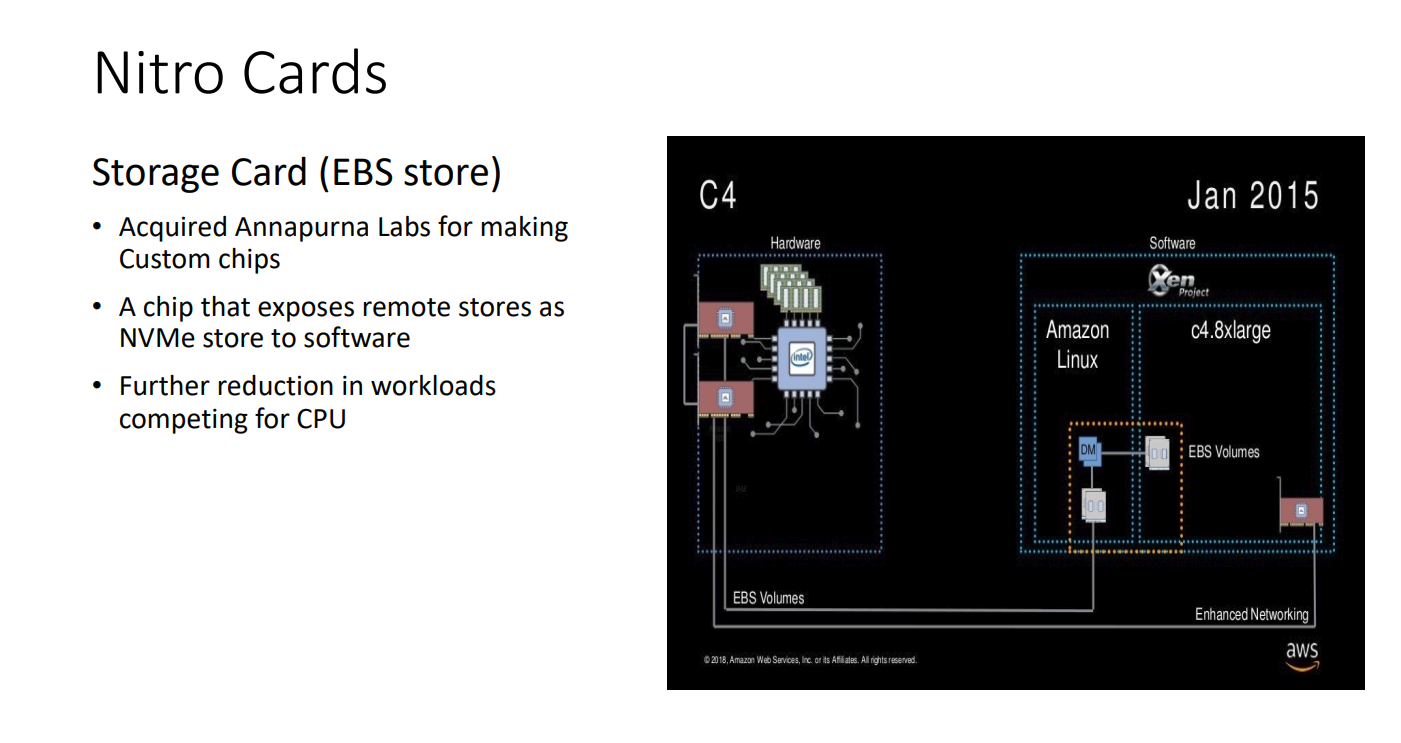
EBS volumes attached to Nitro instances appear as NVMe block
devices, /dev/nvme1n1 goes through exactly this driver with the Nitro card acting as the controller and translating NVMe commands into ops on
network storage. There isn’t much documented about the exact details but this lecture
has a nice overview.
Another aspect of block device abstraction in AWS is torn write prevention which
is a block storage feature where aligned 4 KiB writes are all-or-nothing on EBS volumes attached to Nitro instances (8 and 16 KiB are supported on some
instance-store volumes; nvme id-ns -v tells you what your device supports), provided nothing in the storage stack splits or merges them. AWS aims it at
MySQL and MariaDB, so InnoDB can turn off its doublewrite buffer. This is not a durability guarantee but rather
an atomicity guarantee that NVMe has standardized called AWUPF (Atomic Write Unit Power Fail) you can read more about its benefits in this paper
where it’s argued that the host can skip journaling for updates that fit within the AWUPF size and write them directly, falling back to the journal for
larger ones. They demonstrate it on the metadata of a log-structured RAID (Poseidon OS), not a general-purpose filesystem, and point out why: a filesystem
operation touches several metadata blocks at once (inode bitmap, inode table, directory entry), which rarely fit in one atomic write.
But AWUPF and TWP are not durability guarantees so you still need to fsync or FUA for the data to survive a crash.
What can fail
So when exactly does fsync’s guarantee break ? Well so far we enumerated the following :
-
Filenames, on ext4 the create of the file (which updates the parent directory entry) usually lands in the same journal transaction as the inode and gets committed along with it. But this is not a POSIX thing and other filesystems behave differently. So renames and new files should fsync the parent directory as well.
-
Errors, so far I didn’t go through the
errseq_terror reporting machinery I only looked at the happy path. Each open file description (whatopenreturns;dupandforkshare it) has its own cursor into the error state, so every one that was open when writeback failed sees the error once, on its nextfsync. By the time it’s reported, the failed pages have already been marked clean, i.e. if writeback fails then it’s no bueno. If several processes share one open file description (after afork, for example), whichever callsfsyncfirst consumes the error and the others get success. The error is also stored on the in-memory inode: if the kernel evicts that inode under memory pressure before anyone callsfsync, the error is lost, which is one of the ways PostgreSQL lost writes. This part is very hairy because writeback errors happen asynchronously but when a write fails the last error is recorded and propagated back tostruct file->f_wb_err. Also don’t retry onfsyncfailure because a secondfsyncwill return 0, whenfsyncfails you should crash and recover from a write-ahead-log, if you don’t have a write-ahead-log then you should crash and not acknowledge the write or if it’s thefsyncto the WAL that fails then well you should also not acknowledge it. Treat anyfsyncfailure as awritefailure. -
Disabling or stopping flushes, if you mount with
barrier=0on ext4 or forcewrite_cachetowrite throughor you run in a VM that ignores flushes like QEMU’scache=unsafethenfsyncwill return success as soon as the writes are acknowledged, while the data may still be sitting in a volatile cache. With flushes on, a FLUSH must only complete once the data is on stable media, but some drives have been caught acknowledging it early (Brad Fitzpatrick’sdiskchecker.plexists to catch exactly that). So ensuring the VWC setting of your device and kernel combination is important (for VMs specifically). -
O_DIRECTskips the page cache, so the data goes straight from your buffer to the device but the device can still park it in its volatile cache and the metadata needed to find it again (block allocation when you append or fill a hole, the file size) isn’t committed either. You still needfsync/fdatasync, or open withO_DSYNCso every write behaves as if it were followed byfdatasync(on a drive with a volatile cache the kernel can do that with FUA writes instead of a full flush). -
sync_file_range’s man page calls it “extremely dangerous” it writes back a range of dirty pages but commits no metadata and doesn’t flush the drive’s cache. From a cursory search on Github it seems to be used by key-value caches and some databases. That search query actually yields some good example offsyncfailures that you might want to dig in. -
mmap’d files skipwriteentirely stores land directly in page cache folios. To make them durable callmsync(addr, len, MS_SYNC)(on Linux it ends up in the samevfs_fsync_rangewe walked through, sofsyncon the descriptor works too).MS_ASYNChas been a no-op on Linux since 2.6.19. -
Everything above is Linux. On macOS,
fsyncsends your data to the drive but doesn’t ask the drive to flush its cache. Apple’s man page tells you to usefcntl(fd, F_FULLFSYNC)for that. SQLite exposes it asPRAGMA fullfsync, and Go’sFile.Syncuses it for you on macOS.
Doing it right
So what does a correct write look like ? If you’re replacing a file (config, state, anything you’d hate to find empty after a crash) the pattern is write
to a temporary file, fsync it, rename it over the original and fsync the directory.
int fd = open("data.txt.tmp", O_WRONLY | O_CREAT | O_TRUNC, 0644);
write_all(fd, buf, len);
if (fsync(fd) != 0) abort();
close(fd);

rename("data.txt.tmp", "data.txt");

int dfd = open(".", O_RDONLY | O_DIRECTORY);
if (fsync(dfd) != 0) abort();
close(dfd);
Keep the temporary file in the same directory: rename is only atomic within one filesystem in the case of a brand new file skip the rename but keep both fsyncs,
the file and its parent directory.
The same thing in Python, where os.fsync raises on failure.
import os

def durable_write(path: str, data: bytes) -> None:
    tmp = path + ".tmp"
    with open(tmp, "wb") as f:
        f.write(data)
        f.flush()                  # Python's buffer -> page cache
        os.fsync(f.fileno())       # page cache -> stable media
    os.replace(tmp, path)          # atomic rename
    dfd = os.open(os.path.dirname(path) or ".", os.O_RDONLY)
    try:
        os.fsync(dfd)              # make the rename durable
    finally:
        os.close(dfd)
And in Go, where File.Write already loops on short writes and File.Sync is fsync (F_FULLFSYNC on macOS). The caller should treat any error as
fatal, not retry it:
func durableWrite(path string, data []byte) error {
	tmp := path + ".tmp"
	f, err := os.OpenFile(tmp, os.O_WRONLY|os.O_CREATE|os.O_TRUNC, 0o644)
	if err != nil {
		return err
	}
	if _, err := f.Write(data); err != nil {
		f.Close()
		return err
	}
	if err := f.Sync(); err != nil { // page cache -> stable media
		f.Close()
		return err
	}
	if err := f.Close(); err != nil {
		return err
	}
	if err := os.Rename(tmp, path); err != nil { // atomic rename
		return err
	}
	d, err := os.Open(filepath.Dir(path))
	if err != nil {
		return err
	}
	defer d.Close()
	return d.Sync() // make the rename durable
}
Conclusion
So can you fsync correctly ? Mostly, if you do your part:
fsyncthe file andfsyncthe parent directory when you create or rename something.- Replace files with write
fsync,rename,fsyncthe directory. - If
fsyncfails don’t call it again the error is gone and the pages are clean instead crash, recover from your log and don’t acknowledge the write. - Know what your hardware advertises for
write_cachethe drive’s VWCbarriermount options and your hypervisor’s cache mode. And on macOS,F_FULLFSYNC.
Beyond that it’s probably out of your control.
-
Two ways of getting data out of a drive’s volatile cache. A FLUSH is a standalone command that tells the device to write everything sitting in its cache to stable media before it completes. FUA (Force Unit Access) is a flag on a single write telling the device not to report that write complete until it’s on stable media. ↩
-
A folio is the kernel’s unit of page cache memory: one or more contiguous pages managed as a single unit (introduced in 5.16 to replace passing individual
struct pages around). For our purposes a folio is a chunk of a file’s cached data, and its flags, dirty and writeback, track whether it still needs to reach the disk. ↩ -
A
struct biois the block layer’s description of an I/O: an operation (read, write, flush), flags such asREQ_FUAandREQ_PREFLUSH, a starting sector, and a list of memory segments to transfer, usually pieces of folios. Filesystems build bios and submit them, the block layer merges and splits them into requests for the driver, andbio_endiois called when the I/O completes. ↩ -
People sometimes call this a “context switch”, but it’s a mode switch: the CPU moves from user mode to kernel mode while still running the same task. A real context switch only happens if the scheduler picks a different task, for example while
fsyncsleeps waiting for the device. ↩ -
The doorbell registers start at offset 0x1000 of the controller’s BAR:
dev->dbs = dev->bar + NVME_REG_DBS(L1756). Each queue’s doorbell is&dev->dbs[qid * 2 * dev->db_stride](L1586), withdb_stride = 1 << CAP.DSTRD(L2565). Sincedbspoints to 32-bit words, for queue y that’s byte offset 1000h + (2y × (4 << DSTRD)), the spec’s formula for the submission queue tail doorbell. The completion queue head doorbell is the next slot. ↩